
Emojily - Create Your Emoji1.5.1 - App Store
You'll be able to see results in few seconds.
Publisher Description


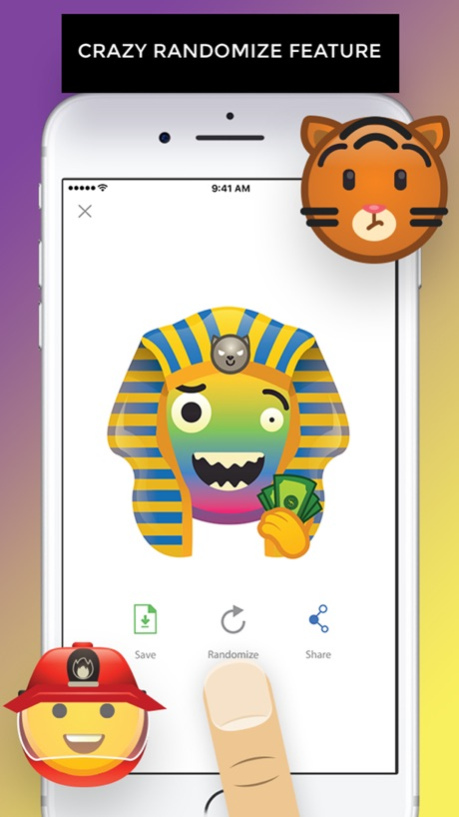
Emojily is a fun tool to create your own emoji.
. Choose from tons of items to make your own unique design.
. Try out the crazy randomize feature.
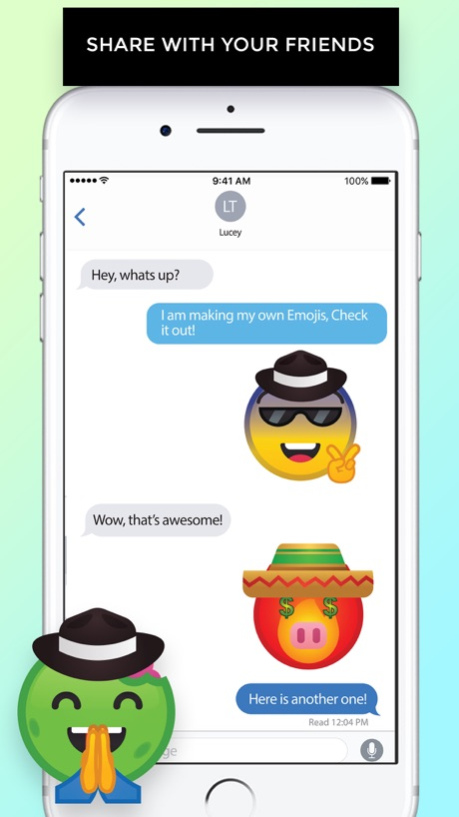
. Share them with your friends in chat, iMessage or social networks such as Facebook, Instagram, etc.
. 3rd party keyboard and iMessage app to use your emoji.
Let's Emojily!
To use in iMessage:
1) In Messages, tap the "> " button.
2) Tap the "App Store" button (3rd button).
3) Tap the bottom left "app drawer" button.
4) Tap "+" and then "Manage" tab.
5) Switch on Emojily and tap "Done".
6) Tap on the Emojily icon to use your saved emoji.
7) Hold and drag to your Message chat bubbles for a cool effect!
Version History A couple of magical fixes like the new magical unicorn emoji that just came out. 1.5.1 08/02/2017 A whole new category of items has arrived! Presenting you, "Accessories & Misc"! Featuring all sorts of cool items to further expand your imagination.
And also, the much requested, Unicorn emoji. Go wild! 1.5 07/29/2017 Super cool fixes installed! 1.4.1 05/07/2017 New parts and items have been added across different categories. Have fun!
*Remember to enable the iMessage App to easily use your saved emoji.* 1.4 04/13/2017 A couple of minor changes to keep everything in tip top condition. 1.3.1 03/28/2017 More awesome fixes that will make Emojily work like magic. 1.3 03/10/2017 A few bug fixes to ensure a smooth experience. 1.2 02/26/2017 New "Facial Hair" category. Go crazy! 1.1 02/17/2017 1.0 01/26/2017
About Emojily - Create Your Emoji
The company that develops Emojily - Create Your Emoji is Zepni Ltd.. The latest version released by its developer is 1.5.1.
To install Emojily - Create Your Emoji on your iOS device, just click the green Continue To App button above to start the installation process. The app is listed on our website since 2026-10-14 and was downloaded 0 times. We have already checked if the download link is safe, however for your own protection we recommend that you scan the downloaded app with your antivirus. Your antivirus may detect the Emojily - Create Your Emoji as malware if the download link is broken.
How to install Emojily - Create Your Emoji on your iOS device:
- Click on the Continue To App button on our website. This will redirect you to the App Store.
- Once the Emojily - Create Your Emoji is shown in the iTunes listing of your iOS device, you can start its download and installation. Tap on the GET button to the right of the app to start downloading it.
- If you are not logged-in the iOS appstore app, you'll be prompted for your your Apple ID and/or password.
- After Emojily - Create Your Emoji is downloaded, you'll see an INSTALL button to the right. Tap on it to start the actual installation of the iOS app.
- Once installation is finished you can tap on the OPEN button to start it. Its icon will also be added to your device home screen.
Program Details
System requirements
Download information
Pricing
Version History
version 1.5.1
posted on 2026-10-14
Version History A couple of magical fixes like the new magical unicorn emoji that just came out. 1.5.1 08/02/2017 A whole new category of items has arrived! Presenting you, "Accessories & Misc"! Featuring all sorts of cool items to further expand your imagination.
And also, the much requested, Unicorn emoji. Go wild! 1.5 07/29/2017 Super cool fixes installed! 1.4.1 05/07/2017 New parts and items have been added across different categories. Have fun!
*Remember to enable the iMessage App to easily use your saved emoji.* 1.4 04/13/2017 A couple of minor changes to keep everything in tip top condition. 1.3.1 03/28/2017 More awesome fixes that will make Emojily work like magic. 1.3 03/10/2017 A few bug fixes to ensure a smooth experience. 1.2 02/26/2017 New "Facial Hair" category. Go crazy! 1.1 02/17/2017 1.0 01/26/2017
version 1.5.1
posted on 2026-09-04
Version History This app has been updated by Apple to prepare for watchOS 27 compatibility. No new features are included.
A couple of magical fixes like the new magical unicorn emoji that just came out. 1.5.1 08/02/2017 A whole new category of items has arrived! Presenting you, "Accessories & Misc"! Featuring all sorts of cool items to further expand your imagination.
And also, the much requested, Unicorn emoji. Go wild! 1.5 07/29/2017 Super cool fixes installed! 1.4.1 05/07/2017 New parts and items have been added across different categories. Have fun!
*Remember to enable the iMessage App to easily use your saved emoji.* 1.4 04/13/2017 A couple of minor changes to keep everything in tip top condition. 1.3.1 03/28/2017 More awesome fixes that will make Emojily work like magic. 1.3 03/10/2017 A few bug fixes to ensure a smooth experience. 1.2 02/26/2017 New "Facial Hair" category. Go crazy! 1.1 02/17/2017 1.0 01/26/2017
version 1.5.1
posted on 2026-08-23
Version History This update from Apple will improve the functionality of this app. No new features are included.
A couple of magical fixes like the new magical unicorn emoji that just came out. 1.5.1 08/02/2017 A whole new category of items has arrived! Presenting you, "Accessories & Misc"! Featuring all sorts of cool items to further expand your imagination.
And also, the much requested, Unicorn emoji. Go wild! 1.5 07/29/2017 Super cool fixes installed! 1.4.1 05/07/2017 New parts and items have been added across different categories. Have fun!
*Remember to enable the iMessage App to easily use your saved emoji.* 1.4 04/13/2017 A couple of minor changes to keep everything in tip top condition. 1.3.1 03/28/2017 More awesome fixes that will make Emojily work like magic. 1.3 03/10/2017 A few bug fixes to ensure a smooth experience. 1.2 02/26/2017 New "Facial Hair" category. Go crazy! 1.1 02/17/2017 1.0 01/26/2017
version 1.5.1
posted on 2017-08-02
Aug 2, 2017 Version 1.5.1
This app has been updated by Apple to display the Apple Watch app icon.
A couple of magical fixes like the new magical unicorn emoji that just came out.
version 1.5.1
posted on 2017-08-02
This app has been updated by Apple to display the Apple Watch app icon.
A couple of magical fixes like the new magical unicorn emoji that just came out.
Disclaimer
Official App Store Link
We do not host Emojily - Create Your Emoji on our servers. We did not scan it for viruses, adware, spyware or other type of malware. This app is hosted by Apple and passed their terms and conditions to be listed there. We recommend caution when installing it.
The App Store link for Emojily - Create Your Emoji is provided to you by apps112.com without any warranties, representations or guarantees of any kind, so access it at your own risk.
If you have questions regarding this particular app contact the publisher directly. For questions about the functionalities of apps112.com contact us.
